---
title: Closure Impact
description: Use mobile data to predict the impact of closing a site
---
[Skip to content](https://support.sitezeus.com/en/closure-impact#main-content)
English
Show submenu for translations
[Contact us](https://support.sitezeus.com/en/kb-tickets/new?hsLang=en)
![SiteZeus-Logo-MARK-2.png\]](https://support.sitezeus.com/hs-fs/hubfs/SiteZeus-Logo-MARK-2.png?height=40&name=SiteZeus-Logo-MARK-2.png)
- [Default HubSpot Blog](https://info.sitezeus.com/blog)
Open main navigation
Close main navigation
- [Default HubSpot Blog](https://info.sitezeus.com/blog)
- English
Show submenu for translations
- [Contact us](https://support.sitezeus.com/en/kb-tickets/new)
- Contact us
Contact us
Hello. How can we help you?
- There are no suggestions because the search field is empty.
1. [Help Center - Locate](https://support.sitezeus.com/en?hsLang=en)
2. [Features](https://support.sitezeus.com/en/features?hsLang=en)
# Closure Impact
## Use mobile data to predict the impact of closing a site
**Note**: The layout for Closure has changed. The panel is now located on the right side of the map as this article shows. A video update is in progress.
Closure impact (also known as reverse impact) occurs when a location closes and transfers their customers to other nearby sites.
- [Mobile data](https://support.sitezeus.com/en/mobile-data?hsLang=en) offers insight into customer trips to and from your existing locations. Each trip has four reference points: **common evening location, common daytime location, last point of interest (POI), and last stop**.
- With machine learning, SiteZeus uses this mobile data to predict which trips to the proposed closure would be likely to transfer to nearby open sites as well as which trips would be lost completely.
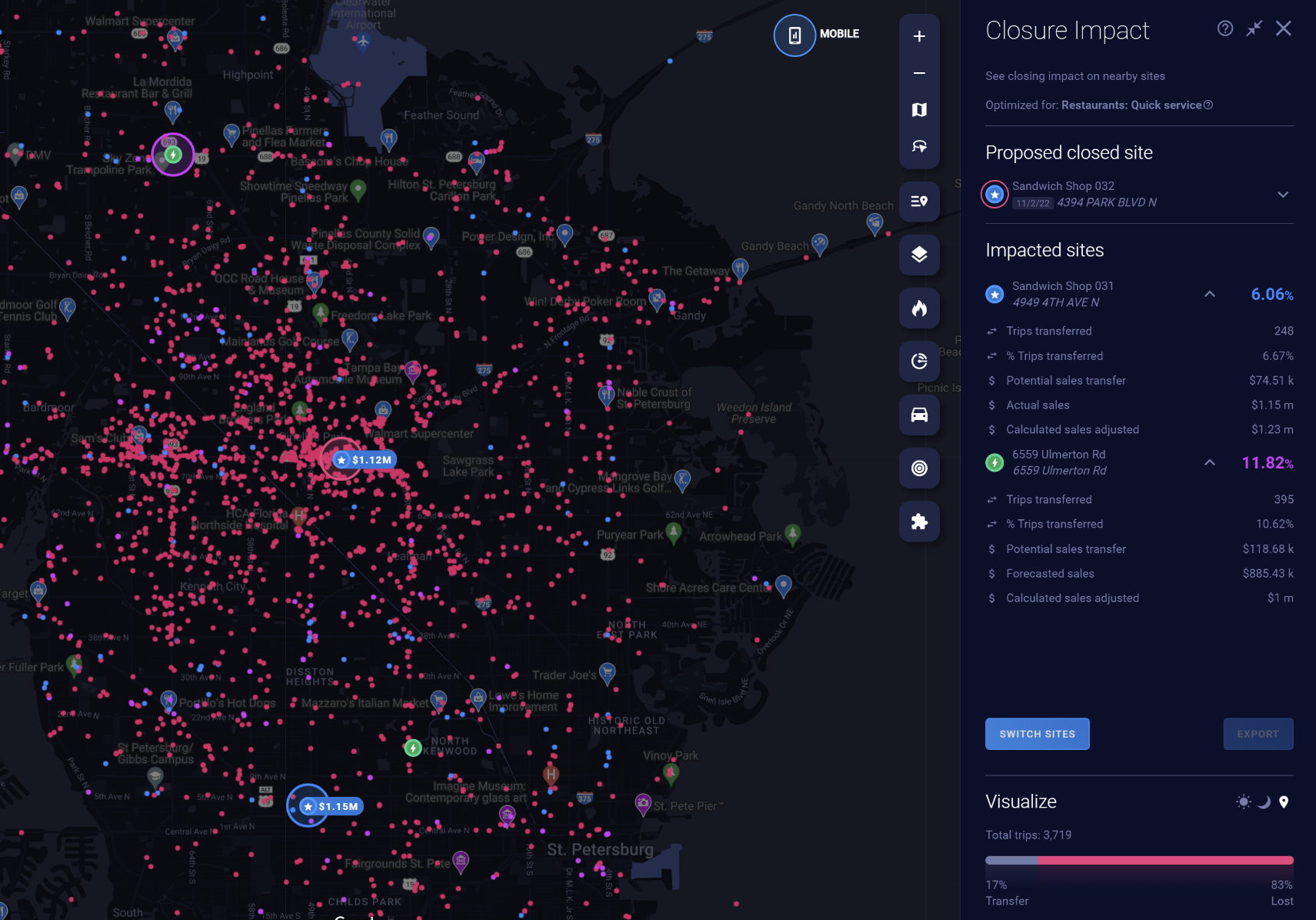
- Results include the percentage of total trips impacted, the revenue implications, and details about the data sampled.
**Note:** This feature is available only in the United States.
### Prerequisites
1. You must have [mobile data](https://support.sitezeus.com/en/mobile-data?hsLang=en) for the site on which you're running Closure Impact Analytics.
2. You must [choose *Quick Service*](https://support.sitezeus.com/en/the-main-menu?hsLang=en#project-settings) as your **model category. **
3. You must [have a subscription](mailto:support@sitezeus.com) to Closure Impact Analytics.
### **Using Closure Impact Analytics**
#### **Select the existing site that you are considering closing**
Select an existing site that you're considering closing to begin looking for nearby Existing or Proposed sites to run the analysis on.
1. Select a site on the map, or use the [Project Sites](https://support.sitezeus.com/en/project-sites?hsLang=en#go-to-site) list.
2. Press the *Closure Impact* button the Project Sites toolbar
3. Closure Impact panel will appear on your right for you to start to choose which nearby sites to run the analysis on.
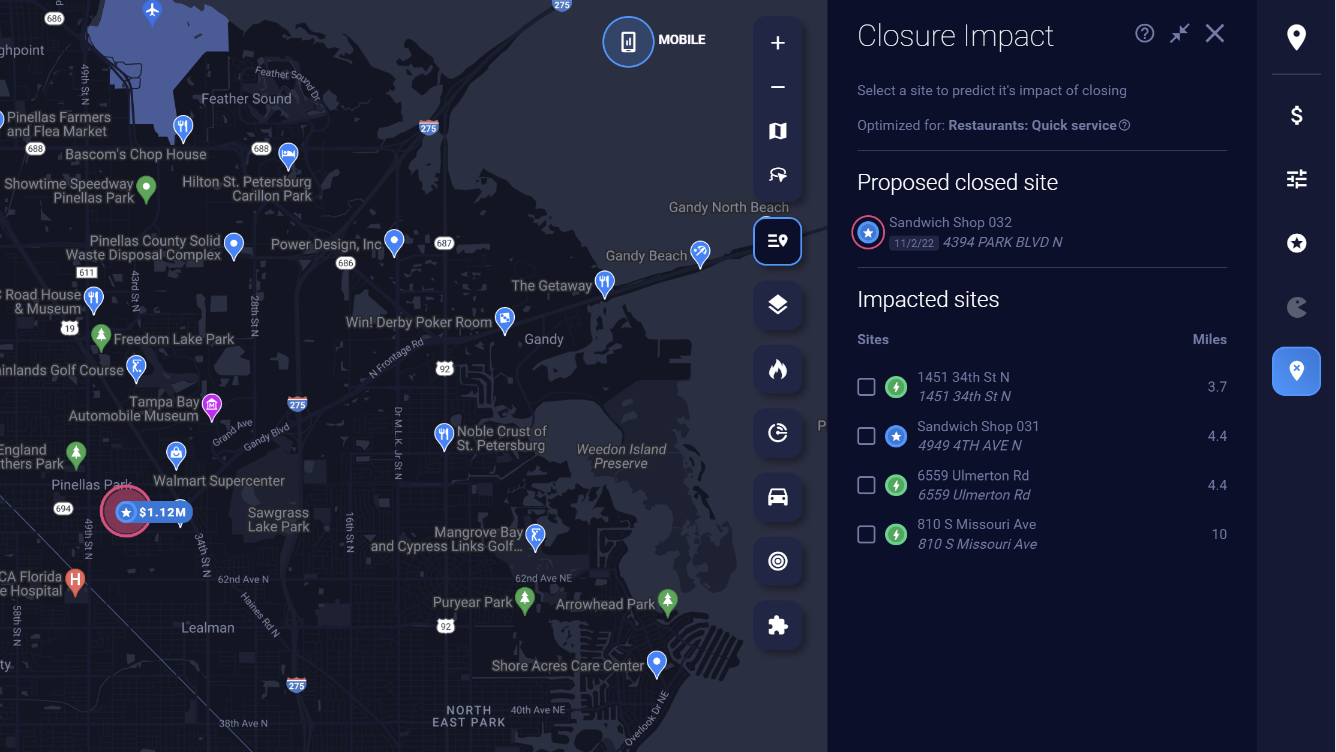
#### **Choose surrounding sites**
Once you select the locations nearby that will remain open, click *Run Impact. *
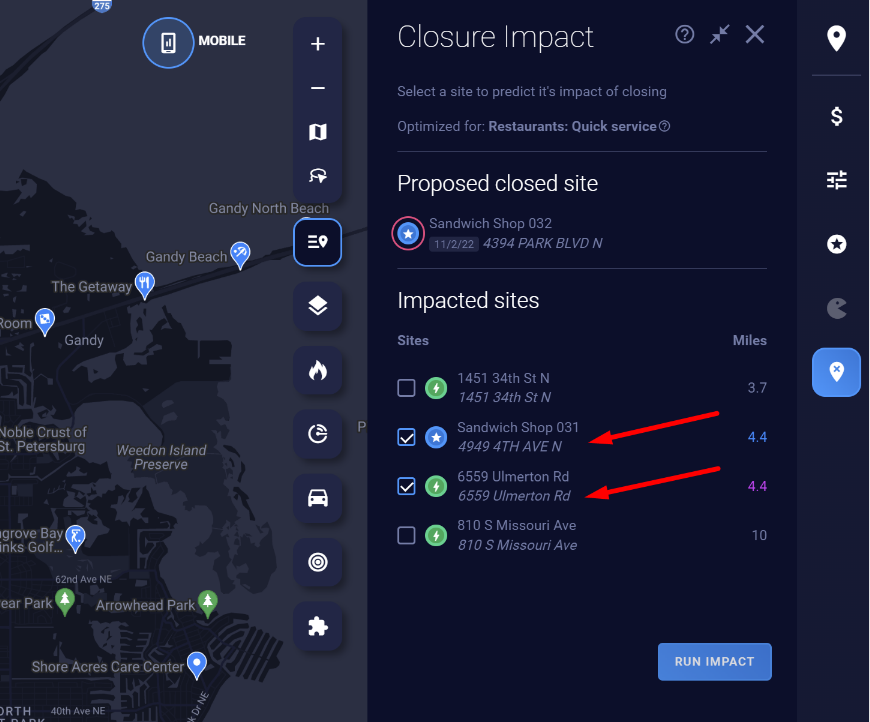
**Note**: You may encounter [disabled sites](https://support.sitezeus.com/en/closure-impact#disabled-sites) that you can’t run Closure Impact on.
#### **Run the analysis**
Once you click Run Impact, it will take a few minutes to process. Once it's complete, you'll see the results appear.
#### **Toggle device type in the visuals**
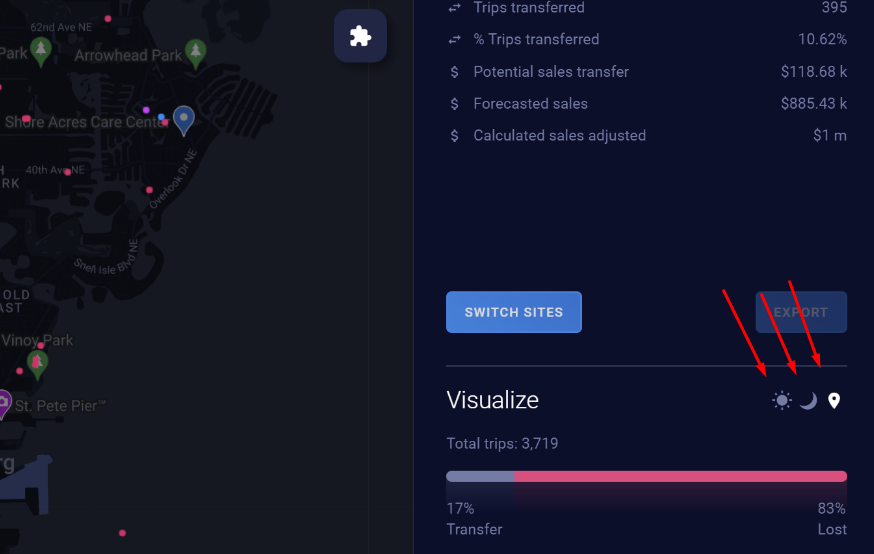
In the Visualize area of the results, you can toggle between the following three customer reference points:
- **Last stop:** Where your customer was immediately before traveling to your location
- **Daytime location:** Where your customer most likely works
- **Evening location:** Where your customer most likely lives
### **Disabled sites**
A Closure Impact analysis cannot be run on certain locations. Hover over a location in the panel to see why a site is disabled. A site will be disabled in the following scenarios:
- The site's [mobile data](https://app.hubspot.com/knowledge/1763074/edit/38478973766/?utm_source=sprocket-menu&__hstc=231263168.f6c1a8d0a6b08983ac9cfc200961414d.1631124310568.1642724823806.1642727222275.256&__hssc=231263168.70.1642727222275&__hsfp=2956229566#mobile-data) hasn't been redeemed.
- The site has a [status](https://app.hubspot.com/knowledge/1763074/edit/38478973766/?utm_source=sprocket-menu&__hstc=231263168.f6c1a8d0a6b08983ac9cfc200961414d.1631124310568.1642724823806.1642727222275.256&__hssc=231263168.70.1642727222275&__hsfp=2956229566#site-statuses) of Queued, Processing, Error, or Incompatible.
- You have more than 10 sites selected.
### **Site statuses**
1. **Queued:** The mobile data for this location has just been redeemed and may take a few minutes to start being processed.
2. **Processing:** The mobile data has moved out of queued status and has begun being processed. It may be a few minutes before you can run a sales impact analysis on this site.
3. **Error:** There was an issue with processing the mobile location data for this site. Email support.sitezeus.com for help.
4. **Incompatible:** The mobile data for the site was activated before Sales Impact launched (July 2020). Refresh the data in the [Mobile Data Dashboard](https://support.sitezeus.com/en/mobile-data-dashboard?hsLang=en) to run an impact analysis.
5. **New:** The mobile location data has been processed, and you can run a sales impact analysis on the site.
### **Mobile data**
To perform a sales impact analysis on a site, you'll need access to that site's mobile data. You can [purchase mobile data tokens](https://support.sitezeus.com/en/mobile-data-dashboard?hsLang=en#purchase-tokens) or [redeem tokens](https://support.sitezeus.com/en/mobile-data?hsLang=en#redeeming-mobile-tokens) you have available.
- [Getting Started](https://support.sitezeus.com/en/getting-started?hsLang=en#main-content)
- [Basics](https://support.sitezeus.com/en/getting-started?hsLang=en#basics)
- [Tour of SiteZeus](https://support.sitezeus.com/en/getting-started?hsLang=en#tour-of-sitezeus)
- [Sites](https://support.sitezeus.com/en/getting-started?hsLang=en#sites)
- [Model](https://support.sitezeus.com/en/getting-started?hsLang=en#model)
- [Forecasting](https://support.sitezeus.com/en/getting-started?hsLang=en#forecasting)
- [Manage Account](https://support.sitezeus.com/en/getting-started?hsLang=en#manage-account)
- [Projects](https://support.sitezeus.com/en/getting-started?hsLang=en#projects)
- [Solutions](https://support.sitezeus.com/en/solutions?hsLang=en)
- [Features](https://support.sitezeus.com/en/features?hsLang=en#main-content)
- [Reporting Wizard](https://support.sitezeus.com/en/features?hsLang=en#reporting-wizard)
- [Polygons](https://support.sitezeus.com/en/features?hsLang=en#polygons)
- [Data Bundles & Open API](https://support.sitezeus.com/en/data-bundles-open-api?hsLang=en)
- [Utilites](https://support.sitezeus.com/en/utilites?hsLang=en)
- [Default HubSpot Blog](https://info.sitezeus.com/blog)
[](https://sitezeus.com/)
Welcome to the SiteZeus Help Center
Copyright © 2026, SiteZeus